The pumpkin soup can be creamier, maybe some sour cream would be tastier. Not much selection of food, but the pork rib was marvellous, and the prawn too.. Overall everything was good. Will come again.
This blog is about a postgraduate student's journey (Started 5th Sept 2014; Viva Voce 24th Aug 2020)
Thursday, April 30, 2015
Mr. Ho's Fine Food @ KK Times Square
I have always wanted to try out the grilled stuff here at Mr. Ho's. Although the place name kinda like a Chinese restaurant, but it's a total western and kinda Germany food with sausages. We got the voucher from groupon for RM48/pax. It's a buffet style with complimentary ice lemon tea and pumpkin soup. Every time I go for buffet, I'll try to capture the memory of my guilty pleasure number of plates I had 😵. Anyway it was a nice evening with my ex-colleague, tasty food and cool atmosphere.
Wednesday, April 29, 2015
Windows Pop up - Do you want to allow the following program to make changes to your computer
One of the annoying pop-up in Windows
This alert pop-up everytime I open a word document, whether the answer is yes or no, the pop up continue with another " There was a problem sending the command to the program".
Firstly, verify that Word isn't being automatically started within Admin Mode
Right Click on the word exe file ->Properties->Compatibility Tab->Privilege Level.
"Do you want to allow the following program to make changes to your computer"
This alert pop-up everytime I open a word document, whether the answer is yes or no, the pop up continue with another " There was a problem sending the command to the program".
Fix:
Firstly, verify that Word isn't being automatically started within Admin Mode
Right Click on the word exe file ->Properties->Compatibility Tab->Privilege Level.
Check Run as Administrator is unchecked.
If it already is, or this doesn't rectify the issue, check Microsoft Office Compatibility.
- Open Microsoft Office Properties
- On Compatibility Tab, check the Compatibility mode is set to your operating system. Mine by default is set to Windows (SP3). Change to Windows 7
Thursday, April 23, 2015
Running Java code and setting its environment variable in Windows 7
You may download Java Development Kit here. Accept the license agreement and choose your system. I'm using Windows x64 (for 64 bit, you may also choose Windows x86 to run 32 bit system)
Setting Windows 7 environment variable for Java
To do this:
Setting Windows 7 environment variable for Java
To do this:
- Open system properties
- Advanced system settings
- Click on environment variables @ bottom right
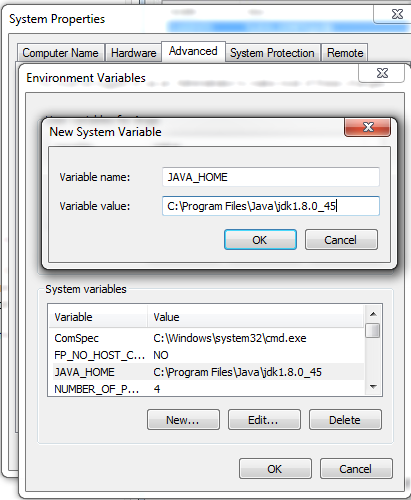
- Click 'New' to create new system variable (Variable name: JAVA_HOME, Variable Value: C:\Program Files\Java\jdk1.8.0_45), then click 'ok'.
- In system variables, scroll down and look for "path"
- Edit the path by append ";%JAVA_HOME%\bin"
- Restart cmd
Tuesday, April 7, 2015
MacFan For Windows Temperature Control in Bootcamp
This apps is simple and useful to control the speed of your fan in bootcamp. Apparently the fan control in Windows Bootcamp is not as good as in OSX.
Steps:
1. Extract the MacFan zip file.
2. Run cmd as admin
3. Navigate to MacFan directories in cmd (my MacFan folder located in Downloads folder)
That's all!
Remarks:
2 apps to download:
Steps:
1. Extract the MacFan zip file.
2. Run cmd as admin
3. Navigate to MacFan directories in cmd (my MacFan folder located in Downloads folder)
Downloads\MacFan0_65\MacFan0_65\MacFan0_65\MacFan.exe
You can see the number of fan you have, and the minimum and maximum fan speed. In my case, I have 1 fan, min of 2000 rpm and, max of 6200 rpm.
| 1 fan, min=2000 rpm, max= 6200 rpm |
4. Now we want to set our fan speed manually (press arrow up, for previous command), say 3000 rpm
Downloads\MacFan0_65\MacFan0_65\MacFan0_65\MacFan.exe 3000
| Setting fan to 3000 rpm |
That's all!
Remarks:
- Restarting your system will put the fan speed to default.
- At 3000 rpm my core temp was > 60 Celsius in idle. I reset the fan speed to 4000 rpm to keep the core temp below 60 Celsius (I run heavy image processing and simulation)
Monday, March 23, 2015
Vehicular Traffic Simulation Using SUMO (Windows based)
A: Getting Your System Ready
First, you need to download the following:
SUMO 0.22.0 (but I changed to SUMO 0.19.0 later on)
Python 2.7.0 (I tried Python 3.6 but got errors)
JOSM (optional)
Before we move on...
You might want to get familiar with running programs from the windows command line (cmd). Check the common command such as cd, dir, etc..
Also, Python scripts have to be processed by another program called the Python Interpreter. The Interpreters read the scripts, compiles it into bytecodes, executes the bytecodes to run the program. So, we have to make sure the command window recognises the word "python" as an instruction to start the interpreter.
Let's say if you entered the command python and hitting return, you should see the version of the Python installed in your system, but.. If you see something like :
'python' is not recognized as an internal or external command, operable program or batch file.
Then you have to make sure your computer knows where to find the Python interpreter.
To do this:
To do this:
- Open system properties
- Advanced system settings
- Click on environment variables @ bottom right
- In system variables, scroll down and look for "path"
- Edit the path by append ";C:\python27"
- Restart cmd
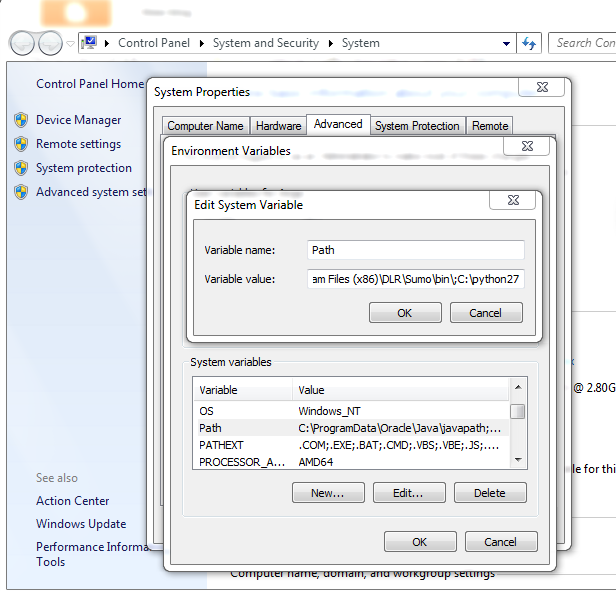
| No space at all ";C\python27" |
B: Simple Traffic Simulation
After you have done all the above, use the following steps to create a simple vehicular traffic simulation in SUMO.
1. Export (download) the OSM map. I rename my map to tfs.osm and put all simulation-needed files in one directory, named tfs.
2. In windows terminal, cd to tfs directory.
3. Enter
netconvert --osm-files tfs.osm -o tfs.net.xml4. Add polygons features to be displayed in sumo-gui. (You may copy typemap_example.xml script from sumo installation file itself into your working directory, and renamed to typemap.xml. Mine located at C>ProgramFilesx86>DLR>Sumo>tools>import>osm). In terminal, enter
polyconvert --net-file tfs.net.xml --type-file typemap.xml -o tfs.poly.xml
After run, a file named "tfs.poly.xml" will be created in tfs directory.
5. Next, we want to generate random vehicular routes. Enter
python randomTrips.py-full-path -n tfs.net.xml -e 50 -lif no error, then enter
python randomTrips.py-full-path -n tfs.net.xml -r tfs.rou.xml -e 50 -l
(You may drag&drop randomTrips.py full path to terminal. Mine located at C>>sumo-0.19.0>tools>trip).
| Step 5: Post edited on 02/06/15, coz I find this step abit confusing (regarding randomTrips.py full path). This figure is based on another example ysgbridge.osm. |
6. Save the following script as tfs.sumo.cfg. Replace "tfs" to your own file name.
7. Finally, enter sumo-gui
Disclaimer: This post is based on a very helpful SUMO tutorial on Linux . Check it out here.
Other useful links:
Python on Windows FAQ
Sumo, randomTrips.py
<configuration xmlns:xsi="http://www.w3.org/2001/XMLSchema-instance" xsi:noNamespaceSchemaLocation="http://sumo.sf.net/xsd/sumoConfiguration.xsd">
<input> <net-file value="tfs.net.xml"/> <route-files value="tfs.rou.xml"/> <additional-files value="tfs.poly.xml"/> </input>
<time> <begin value="0"/> <end value="1000"/> <step-length value="0.1"/> </time></configuration>
7. Finally, enter sumo-gui
| 7 files will be created from all the steps above |
Disclaimer: This post is based on a very helpful SUMO tutorial on Linux . Check it out here.
Other useful links:
Python on Windows FAQ
Sumo, randomTrips.py
Tuesday, March 10, 2015
Geoje Island Winter Getaway
From 12 Feb to 22 Feb 2015.
I had a very sweet vacation (solo traveller) in Geoje Island, South Korea. It wasn't like my other vacations with friends in Hong Kong, Philippines and Bali, where everyday packed with activities and places to go. It was very tiring and super exhausted in the end of the day. My 10 days in South Korea more like a retreat, relaxing getaway. What made it sweet was I didn't have anything plan out, in fact I never plan to visit South Korea. It's more like an impulse vacation, got the air tickets 10 days before takeoff. I stayed at friend's place thus not feeling guilty for just lie-in instead of grabbing all the waking moments to visit all the places I can.
Some yummy meal
I really enjoy my days in Okpo although I didn't go much places. I certainly come back again to visit this beautiful city.
I had a very sweet vacation (solo traveller) in Geoje Island, South Korea. It wasn't like my other vacations with friends in Hong Kong, Philippines and Bali, where everyday packed with activities and places to go. It was very tiring and super exhausted in the end of the day. My 10 days in South Korea more like a retreat, relaxing getaway. What made it sweet was I didn't have anything plan out, in fact I never plan to visit South Korea. It's more like an impulse vacation, got the air tickets 10 days before takeoff. I stayed at friend's place thus not feeling guilty for just lie-in instead of grabbing all the waking moments to visit all the places I can.
I enjoyed the chilling weather, the gloomy spooky tree scenery, Korean naked bath in Spa Land, pork bbq was very nice in the winter (I think we will melt having bbq in tropical country), the Korean top notch Customer Service (felt like a VVIP), Korean skincare haul (I'm not myself anymore at Incheon Airport duty free), and etc etc etc...
Let's see bits of the photo diaries:
Travel by AirAsia X. Arrive in Gimhae Airport, Busan.
Took a bus from Gimhae Airport to Okpo, 7000 KRW
![]() |
| Arrive ~ 8am |
| Walking around Okpo |
Oedo Botanica Garden
Took a bus from Okpo to Jangseungpo, 1200 KRW
Entrance fee 30,000 KRW
![]() |
| Just opposite Ocean Hotel, walk heading to jetty |
![]() |
| Kinda cloudy |
![]() |
| Stairway to Heaven |
![]() |
| Adam and Eve and the apple. |
Haeundae Beach
Bus from Okpo to Sasang, 6800 KRW and Metro 1 day pass 4500 KRW
![]() |
| Get off at Haundae Station |
| The weather forecast said it will be cloudy in Busan, seems like it doesn't apply to this sun & fun place |
![]() |
| It was a sunny day. |
![]() |
![]() |
| Great walk on the beach.. |
Okpo Great View
![]() |
![]() |
![]() |
![]() |
![]() |
![]() |
| This is how Geoje pull off the name 'blue city' |
![]() |
| Last day in Okpo, Geoje. Taking the moment to write my diary. |
Some yummy meal
| Street food. This ajumma very friendly |
I really enjoy my days in Okpo although I didn't go much places. I certainly come back again to visit this beautiful city.
Wednesday, January 14, 2015
Export m-file as pdf in Matlab for Mac
First of all, the interface in Matlab for Mac could be different from Windows.
Step 1: Select Edit Publishing Option
Step 2: Select the output file as 'pdf'
Step 3: Choose your output folder
Step 1: Select Edit Publishing Option
![]() |
| Step 1 |
Step 2: Select the output file as 'pdf'
Step 3: Choose your output folder
![]() |
| Step 2 & 3 |
Subscribe to:
Posts (Atom)